
What Is a PDF?
Updated by Khokhar Sab
A PDF is a file that holds finished pages. PDF stands for Portable Document Format: a document saved as a PDF keeps its layout, fonts and pictures, so it looks the same on a phone, a laptop and a printer. Adobe created the format in 1993, and it has been an ISO standard since 2008. To look at one right now, open it in our PDF Viewer.
What does PDF stand for?
PDF stands for Portable Document Format. It is a file format for finished documents: each page is stored with its text, pictures, fonts and layout fixed in place, so the file opens and prints the same way on any computer, phone or printer. PDF files end in .pdf and have the media type application/pdf.
So the meaning of PDF is in its name. Portable means the file travels between devices and apps without changing. Document means it holds pages, from a one-page receipt to a book. Format means a published set of rules any app can follow to read or write it. The first bytes of every PDF are the characters %PDF- followed by the version number, which is how software recognizes one even when the file name is wrong.
Who created the PDF, and when?
Adobe created PDF. Co-founder John Warnock described the idea in his 1991 Camelot Project, a plan for documents that look the same on every screen and printer. Adobe published the PDF 1.0 specification in June 1993, then revised the format seven times, from PDF 1.1 up to PDF 1.7, before handing it to ISO.
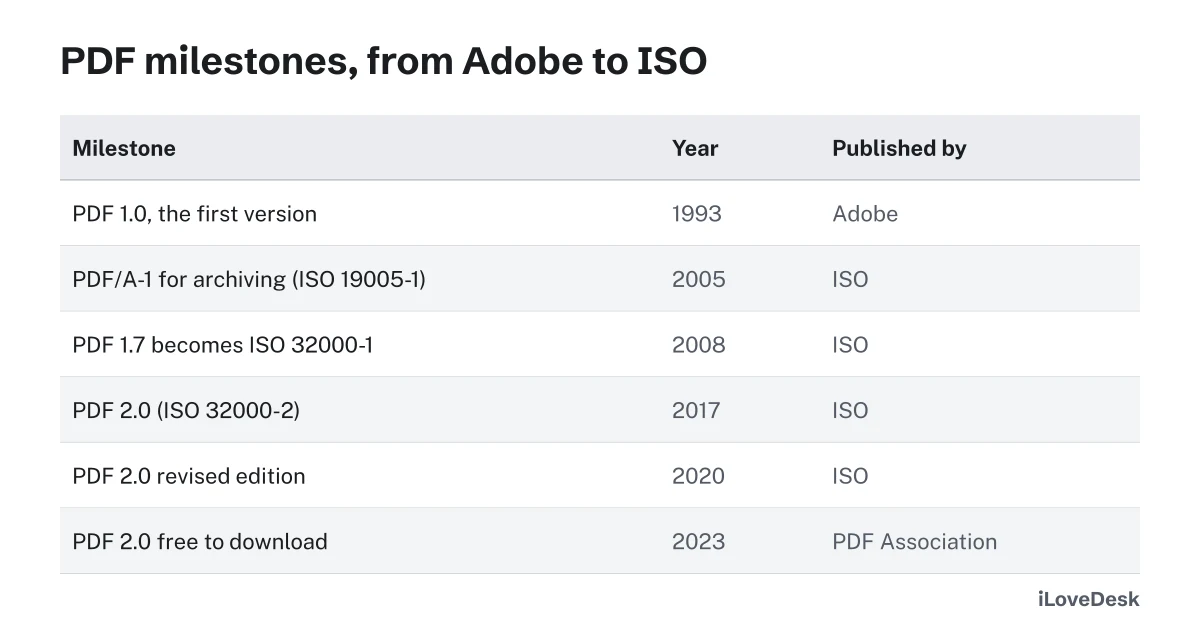
The PDF Association's timeline of PDF milestones starts with the 1991 Camelot Project. The Library of Congress, quoting Adobe's own PDF Reference, dates the start of the work to early 1990, when PostScript was becoming the standard way to describe printed pages. PDF kept PostScript's way of drawing a page and added a document structure and navigation on top, so the same file could be read on screen and printed anywhere.
Is PDF an open standard?
Yes. Adobe handed PDF 1.7 to the International Organization for Standardization, which published it as ISO 32000-1 in 2008. PDF 2.0 followed as ISO 32000-2 in 2017, with a revised edition in 2020. Since April 2023, the PDF Association offers the PDF 2.0 standard as a free download, sponsored by PDF software companies.
| Version | Published by | Year | Header in the file |
|---|---|---|---|
| PDF 1.0 | Adobe (PDF Reference 1.0) | 1993 | %PDF-1.0 |
| PDF 1.1 to 1.7 | Adobe revisions | Before 2008 | %PDF-1.1 to %PDF-1.7 |
| PDF 1.7 | ISO 32000-1:2008 | 2008 | %PDF-1.7 |
| PDF 2.0 | ISO 32000-2:2017 | 2017 | %PDF-2.0 |
| PDF 2.0, revised | ISO 32000-2:2020 | 2020 | %PDF-2.0 |
The PDF Association says developers have been free to read and implement the PDF specifications since 1993, and that ISO 32000-2 was the first core PDF standard sold only by ISO, until the no-cost edition arrived on April 5, 2023, paid for by Adobe, Apryse and Foxit. The Library of Congress adds that the Adobe patents it lists for PDF were all expected to expire in the US by May 2019. Anyone can write software that reads or makes PDFs, which is how this site's tools work.
Why does a PDF look the same on every device?
A PDF stores finished pages. Every letter, line and picture has a fixed position on a page of a fixed size, and the fonts are usually embedded in the file. A reader only draws what is there, so it does not reflow the text with its own fonts the way a Word file or a web page does.
The Library of Congress describes PDF's drawing model as device-independent and resolution-independent: text and lines are stored as shapes and instructions, so they stay sharp at any zoom and on any printer. Photos are the exception, since a picture has a fixed number of pixels. The one common way a PDF changes between computers is a font that was not embedded; the reader then swaps in a similar font, and lines can shift. Our guide Why a Converted Document Looks Different measures how far text moves when fonts change.
What is inside a PDF file?
A PDF is a set of numbered objects: a catalog that points to the list of pages, page objects that give each page its size, fonts, pictures, and content streams of drawing instructions. A cross-reference table near the end lists where each object starts, so a reader can jump straight to any page without reading the whole file.
To show this, we wrote the smallest useful PDF by hand: one US Letter page with the words "Hello, PDF". It is 585 bytes of plain text with 5 objects. PDF.js, the PDF engine built into Firefox, opened it as 1 page of 8.5 by 11 inches and read the text back. Here is the whole file:
%PDF-1.7
1 0 obj
<< /Type /Catalog /Pages 2 0 R >>
endobj
2 0 obj
<< /Type /Pages /Kids [3 0 R] /Count 1 >>
endobj
3 0 obj
<< /Type /Page /Parent 2 0 R /MediaBox [0 0 612 792] /Resources << /Font << /F1 4 0 R >> >> /Contents 5 0 R >>
endobj
4 0 obj
<< /Type /Font /Subtype /Type1 /BaseFont /Helvetica >>
endobj
5 0 obj
<< /Length 41 >>
stream
BT /F1 24 Tf 72 700 Td (Hello, PDF) Tj ET
endstream
endobj
xref
0 6
0000000000 65535 f
0000000009 00000 n
0000000058 00000 n
0000000115 00000 n
0000000241 00000 n
0000000311 00000 n
trailer
<< /Size 6 /Root 1 0 R >>
startxref
402
%%EOF
| Part | What it does |
|---|---|
%PDF-1.7 | The header: this is a PDF, written to version 1.7. |
1 0 obj (Catalog) | The root of the document. It points to the list of pages. |
2 0 obj (Pages) | The page list: one page, object 3. |
3 0 obj (Page) | The page itself: 612 by 792 points, which is 8.5 by 11 inches (US Letter), plus the font and drawing instructions it uses. |
4 0 obj (Font) | Helvetica, one of the standard fonts PDF readers supply, so this tiny file does not have to carry it. |
5 0 obj (content stream) | The drawing instructions: begin text (BT), Helvetica at 24 points (Tf), move to 72 points from the left and 700 from the bottom (Td), show the text (Tj), end text (ET). |
xref | The cross-reference table: the byte position where each object starts. |
trailer, startxref, %%EOF | Where to find the catalog and the xref table, and the end of the file. Readers start here, at the end. |
Real PDFs use the same parts, with more of them. Streams are usually compressed, fonts and pictures are stored as objects of their own, and a file can add bookmarks, links, comments, form fields, attached files, metadata such as the author's name, and digital signatures. Our guide What PDF Metadata Reveals About You shows the hidden details a typical file carries.
What is the difference between a text PDF and a scanned PDF?
A PDF made from a document holds real text, so you can search it, copy it and have it read aloud. A scanned PDF holds a photo of each page, so to a computer it is a picture with no letters in it. OCR, short for optical character recognition, reads the picture and adds a hidden layer of real text.
| Version | Size | Characters you can copy |
|---|---|---|
| Typed document saved as PDF | 1.3 KB | 145 |
| Scanned at 150 dpi | 24.3 KB | 0 |
| The same scan after OCR | 33.3 KB | 145 |
To check which kind you have, press Ctrl+F (Command+F on a Mac) and search for a word you can see on the page. If nothing is found, the page is a picture; OCR PDF adds the missing text in your browser. Searchable vs Scanned PDF explains the test in full.
What is PDF/A?
PDF/A is the archiving version of PDF, set out in the ISO 19005 standards. It bans anything that could stop a file from showing the same way decades from now: every font must be embedded, colors must be defined device-independently, and encryption, JavaScript, audio and video are not allowed. PDF/A-1 came out in 2005.
- PDF/A-1 (ISO 19005-1, 2005) is based on PDF 1.4.
- PDF/A-2 (ISO 19005-2, 2011) is based on PDF 1.7 and can hold attachments that are PDF/A files too.
- PDF/A-3 adds attached files in any format.
- PDF/A-4 is based on PDF 2.0.
These details come from the Library of Congress description of the PDF/A family. Courts, governments and records offices may ask for PDF/A when you file documents. PDF to PDF/A checks a file, embeds its fonts, removes scripts and adds the PDF/A identification, all in your browser.
How do I open a PDF file?
Double-click it. Windows opens PDFs in Microsoft Edge, a Mac opens them in Preview, and Chrome, Edge, Firefox and Safari all show PDFs in a browser tab without extra software. On a phone or a shared computer, our PDF Viewer shows the pages in your browser, with search and zoom, and never uploads the file.
If a PDF asks for a password, it is encrypted, and you need the password from whoever sent it. Once you have it, Unlock PDF saves a copy that opens without one. A file that will not open at all may be damaged in transfer, so ask for it again.
Can you edit a PDF?
Yes. PDFs are built as finished pages, so editing suits smaller changes: fixing a word, adding text, a signature or a picture, or covering something up. Edit PDF does these in your browser. For a big rewrite, convert the PDF to Word, change it there, and save it as a PDF again, which keeps the new layout tidy.
- Change or add text: Edit PDF covers the old words and retypes them at the same size and color, in a font close to the original.
- Sign or fill in: Sign PDF places your signature, and Fill PDF fills in forms.
- Rearrange pages: Organize PDF moves, adds and deletes pages.
- Hide information for good: white-out only covers text, so use Redact PDF to remove it.
- Rewrite the document: PDF to Word rebuilds paragraphs, lists and tables in a .docx file.
How do I convert a file to or from PDF?
Word, Excel and PowerPoint save a copy as PDF from Save As or Export, and Windows and macOS can print from almost any app to a PDF file. In the browser, our PDF Converter takes a document, picture or ebook and opens the right tool to make it a PDF, or turns a PDF into Word, Excel, pictures or text.
For one job, go straight to the tool: Word to PDF, JPG to PDF for photos and scans, PDF to Word to edit the text, or PDF to JPG for pictures of each page. The PDF Converter picks among them when you are not sure which you need. To decide which format to send in the first place, see PDF vs DOCX and PDF vs JPG.
How big is a PDF file?
It depends on what the pages hold. In our tests, one A4 page of text in a standard font came to 2.7 KB, while the same kind of page scanned at 150 dpi was 288.4 KB and at 300 dpi 759.1 KB. Text and lines take very little room; photos, scans and fully embedded fonts take the most.
| Page | File size |
|---|---|
| Standard font, not embedded (Helvetica) | 2.7 KB |
| Embedded subset (only the letters used) | 10.1 KB |
| Embedded in full (DejaVu Sans, every glyph) | 417.8 KB |
| Scan at 150 dpi | 288.4 KB |
| Scan at 300 dpi | 759.1 KB |
Why Is My PDF So Large? breaks down each cause. To shrink a file for email or an upload form, Compress PDF reduces the pictures inside and leaves the text sharp.
Are PDF files secure?
A PDF can be locked with a password and encrypted; PDF 2.0 uses AES-256 encryption. It can also carry a digital signature that shows whether the file changed after signing. Like any file from a stranger, a PDF can contain links and scripts, so open unexpected attachments with care and keep your PDF reader up to date.
- Passwords: Password Protect PDF adds an open password with AES-256. PDF Open Password vs Permissions Password shows which kind keeps a file private.
- Signatures: a drawn signature is a picture, while a certificate-based digital signature detects changes. See Electronic vs Digital Signature.
- Uploading: PDF websites that work on a server upload your file there. Every tool on this site runs in your browser instead; Is It Safe to Upload a PDF Online? shows how to check any site.
Have a PDF to look at? Open it in the PDF Viewer; it stays on your device.
Tools in this guide
More guides
- PDF vs DOCX: Which Should You Send?The same report as both: size, layout, editing and hidden comments compared.
- Why a Converted Document Looks DifferentFonts and line spacing measured in 11 fonts: why lines and pages move, and how to stop it.
- How to Prepare PDFs for a Job ApplicationFormat, one file or several, size limits, file names and checks, with a real pack measured.
Sources and further reading
- Library of Congress: PDF (Portable Document Format) Family: history, the %PDF header, the PostScript imaging model and patents
- Library of Congress: PDF 2.0, ISO 32000-2 (2017, 2020): PDF 1.0 in June 1993 and the seven Adobe revisions
- Library of Congress: PDF/A Family, PDF for Long-term Preservation: PDF/A versions and their rules
- ISO 32000-1:2008, Part 1: PDF 1.7
- ISO 32000-2:2020, Part 2: PDF 2.0
- ISO 19005-1:2005, Use of PDF 1.4 (PDF/A-1)
- PDF Association: A Timeline of Innovation: the 1991 Camelot Project and the move to ISO
- PDF Association: Sponsored ISO standards for PDF technology: PDF 2.0 free to download since April 5, 2023
- PDF Association: PDF/A in a Nutshell 2.0