
Quote Template
Price a job or an order before you start. List the items, add tax and a discount, set how long the price holds, and download a PDF to send. Need a blank file instead? Pick a Word, Excel or fillable PDF quote template further down.
- What you type stays on your device. Nothing is uploaded.
- Free, no sign-up, no daily limit.
- Works with Wi-Fi off once the page has loaded. Check it yourself
Updated by Khokhar Sab
What is a quote?
A quote, also called a price quote or quotation, is a written price you offer for a defined job or list of goods. Cambridge Dictionary defines a quotation as the price someone says they will charge. It names the items, the total, how long the price holds and how the buyer accepts.
Sellers send a quote after a buyer describes what they want and before any work or shipping starts. The buyer compares it with other quotes and, if it suits, accepts it. An accepted quote leads to an invoice once the job is done.
What is the difference between a quote and an estimate?
A quote is a price you stand behind for a stated period, while an estimate is a best guess that can change. Cambridge Dictionary describes an estimate as the likely cost of a job. Send a quote when the scope is fixed, and an estimate when hidden work could move the price.
Both documents list items and a total. The difference is the promise. If you cannot know the final cost until work starts, such as a repair behind a wall, use the estimate template and say what could change the price. If you can fix the price, use this quote maker.
How do I write a quote?
Put your business details at the top and the client under Prepared for. List each item or block of labor on its own line with a quantity and price. Add tax and a discount if they apply, check the valid-until date, add terms such as a deposit and lead time, then download the PDF.
- Type your business at the top and the client under Prepared for.
- Add a line for each item and each block of labor. Untick taxed under lines that carry no tax.
- Press + Tax or + Discount and type the rate.
- Choose Valid for beside the page: 7, 14, 30, 60 or 90 days.
- Under Terms starter, pick a deposit and type a lead time, then press Add to terms.
- Press Download PDF.
What should a quote include?
Include your business name and contact details, the client's name, a quote number and date, a valid-until date, each item with quantity and price, tax, any discount, the total, the deposit and lead time, and a line for the client to sign. Each design in the maker has a place for all of these.
- Scope: the Scope of work box says what the price covers and what it leaves out.
- Terms: the deposit, the lead time and anything that could change the price, such as extra materials.
- Acceptance: a block where the client signs and dates. To have the client sign the PDF on screen, send it with a link to Sign PDF.
How is a quote total worked out?
Each line is quantity times price. The lines add up to the subtotal, the discount comes off, and tax is charged on the taxed lines after their share of the discount. The deposit is a percent of that total. The maker updates every figure as you type, so you can check it before you send.
Here is the example job, calculated by the tool on a quote dated Oct 14, 2026 and valid until Nov 13, 2026:
| Utility sink, 3 at $120 (taxed) | $360.00 |
|---|---|
| Install labor, 8 hours at $55 (not taxed) | $440.00 |
| Subtotal | $800.00 |
| Discount, 10% | -$80.00 |
| Sales tax 8% on the sinks after their share of the discount | $25.92 |
| Quote total | $745.92 |
| Deposit due on acceptance, 50% | $372.96 |
Whether labor is taxed depends on where you work and what the job is, so check with your state or local tax office.
How long is a quote valid?
As long as you write on it. The maker starts at 30 days after the quote date and lets you pick 7, 14, 60 or 90 days, or type any date on the page. A shorter window protects you when material costs move. After that date, send a fresh quote instead of honoring a price you can no longer meet.
The date prints as Valid until near the top, and the sentence under the totals repeats it. Changing the quote date does not move it, so pick Valid for again after you edit the date.
Is a quote legally binding?
It can be. A quote with a fixed price, a clear scope and an expiry date works like an offer, and the client's acceptance can form a contract. Wording and state law decide. For large jobs, ask a lawyer to read your quote terms. This is general information, not legal advice.
The rules differ by setting. In federal purchasing, the regulation says a quotation is not an offer (48 CFR 13.004), so the government buyer's order is the offer. For sales of goods, Uniform Commercial Code section 2-205 says a merchant's signed written offer that promises to stay open cannot be withdrawn for the stated time, up to three months (UCC 2-205). Use plain terms: what is included, what is not, the deposit and how long the price holds.
How do I turn a quote into an invoice?
Press Convert to invoice beside the page. The invoice generator opens with the client, items, discount and tax filled in, the next invoice number, Net 30 terms and a due date. Add your payment details and download the PDF. You can also save the quote as a .json copy and open it there.
If the client asked for the deposit before you start, a proforma invoice is the usual document for that. For an order you place with a supplier, see the purchase order template.
Where can I download a free quote template for Word, Excel or PDF?
Right below. Pick one of three versions and download it as a fillable PDF, a Word file or an Excel sheet. The files are made in your browser and nothing is uploaded. Only the Excel sheet does the arithmetic; the PDF and Word files are blank forms you type into.
Files are made in your browser. Nothing is uploaded.
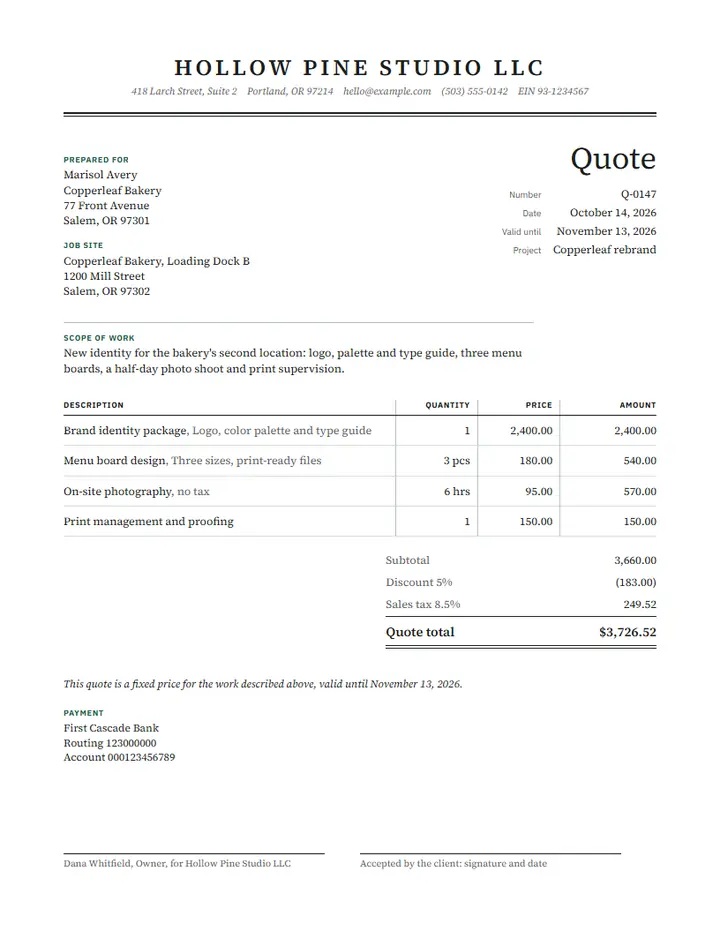
Standard quote template
Best for: Products or mixed items, with sales tax on some lines
Description, quantity, unit price and a Taxable column, so sales tax lands only on the lines you mark Y. A deposit row shows what is due on acceptance.
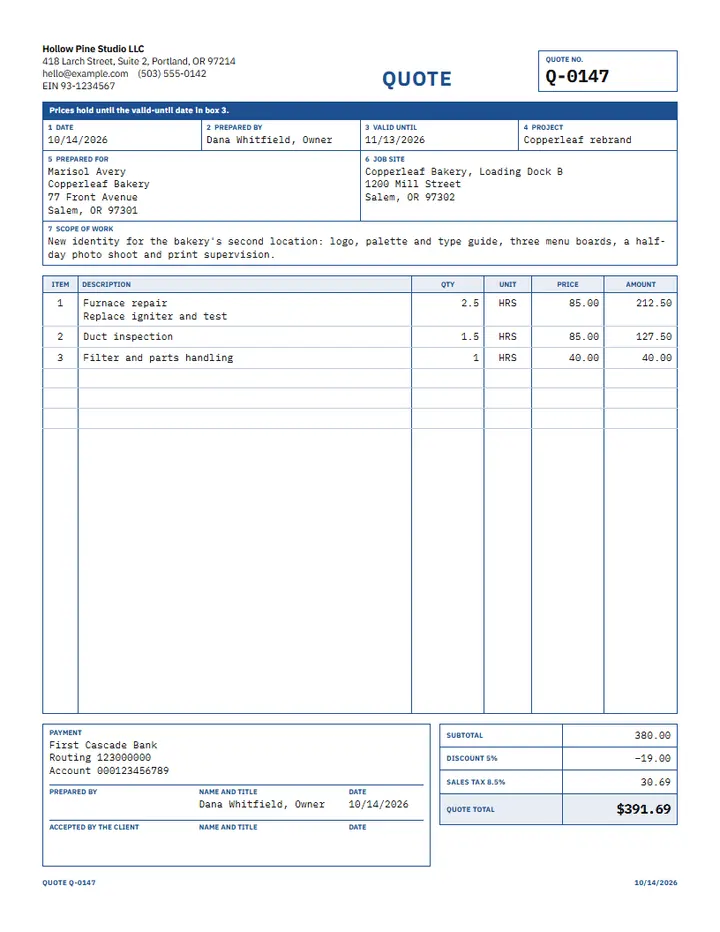
Service quote template
Best for: Repairs, cleaning, installs and other jobs priced by the hour plus materials
Work described line by line with hours and an hourly rate, a line for materials, and tax on the whole subtotal.
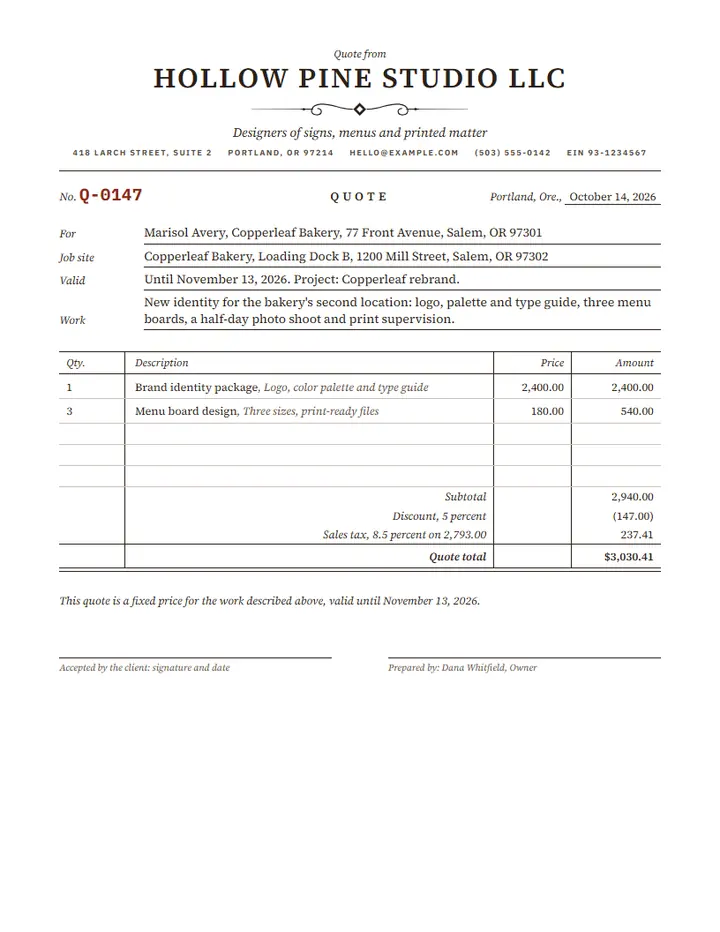
Simple quote template
Best for: One-off jobs and small sellers who need a description, a price and a total
Description, quantity and price, with an optional tax rate on the whole subtotal and a total. No discount, delivery or deposit rows.
Which quote template format is best: Word, Excel or PDF?
Excel is the best fit when you want totals worked out for you, because the line amounts, tax, total and deposit are formulas. Word suits free editing of the layout and wording. The fillable PDF keeps the design exactly and suits filling on a screen or printing. Only the Excel sheet does arithmetic.
- Excel (.xlsx): shaded cells are yours to fill, every other cell is a formula. It works in Excel and in any spreadsheet app that opens .xlsx files.
- Word (.docx): real tables you can resize, recolor and add rows to. Type the amounts yourself.
- PDF: the same design as the quote maker above, with a form field over every blank. Fill it in any PDF reader, or in a web browser such as Chrome or Edge.
What do the Excel quote formulas do?
Each sheet has your business at the top, the quote number and dates at the right, a Prepared for block, the item table, the totals and an acceptance block. On the standard sheet, 2 cabinets at $310 (taxed) and 1 install at $275, with 5% off, 8% tax and $40 delivery, give 937.37, and a 30% deposit is 281.21. Every version has its own set of formulas, listed here from the code that writes the files.
- Standard quote
- Each line amount = quantity x price, rounded to the cent. Subtotal = the sum of the line amounts. Discount = subtotal x discount rate. Tax = the lines marked Y, less their share of the discount, x tax rate. Quote total = subtotal - discount + tax + delivery. Deposit due = total x deposit rate. Valid until = quote date + days valid.
- Service quote
- Each line amount = quantity x price, rounded to the cent. Subtotal = the sum of the line amounts. Tax = subtotal x tax rate. Quote total = subtotal + tax + materials. Deposit due = total x deposit rate. Valid until = quote date + days valid.
- Simple quote
- Each line amount = quantity x price, rounded to the cent. Subtotal = the sum of the line amounts. Tax = subtotal x tax rate. Quote total = subtotal + tax. Valid until = quote date + days valid.
Each line amount is rounded to the cent and the tax is rounded once. Type the tax, discount and deposit rates as percentages: 8.25% is stored correctly. Amounts have no currency symbol, so the sheets work in any currency.
Limits
- The client signs outside this tool. The acceptance block prints a line to sign and date.
- Only the Excel sheet calculates. The PDF and Word files are blank forms, and the PDF has no deposit rows: write the deposit under Terms.
- One tax rate per quote in the Excel files. The quote maker also offers a second tax under More options.
- The formulas are checked by reading each file back and comparing the cells with hand-worked numbers. Excel recalculates every sheet when it opens.
Frequently asked questions
Is it free?
Yes. No sign-up, no watermark, no limit.
Can I call it a quotation?
Yes. Under Call it, pick Quote or Quotation. Pick Estimate for a price that may change.
Can I add my logo?
Yes, in the quote maker, as PNG, JPG, WebP or SVG. In the Word file, click the header area and insert a picture.
Does it remember my business details?
Yes, in this browser, along with saved clients and the current draft. Nothing is uploaded.
Can I use it as a sales quote or a service quote?
Yes. Use the standard version for products and the service version for work priced by the hour plus materials.
Related tools
How this tool was built and tested
- Cambridge Dictionary: quotation: the price someone says they will charge
- Cambridge Dictionary: estimate: a statement of the likely cost of a job
- 48 CFR 13.004, Legal effect of quotations: a quotation to the federal government is not an offer
- Uniform Commercial Code 2-205, Firm Offers: how long a signed offer of goods can stay open
- pdf-lib, Cantoo fork (MIT), version 2.11.1: writes the PDF